



Features

Everything the planner runs on.

Four things asambl does that are worth seeing work, and then the full list of what ships in the beta today.

Weekly planning

One draft. A team of planners. Your call on every block.

A guided ritual turns your priorities and capacity into a plan, one question at a time, with last week’s unfinished work carried forward.

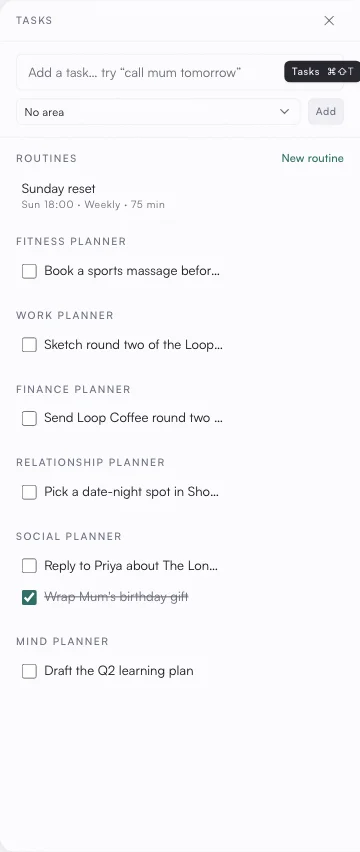
Behind the draft, a conductor hands each life area to its own specialist planner, then checks their proposals against each other and reconciles the clashes into one week sized to the energy you actually have.

Every plan arrives as a draft you read and approve. Nothing lands on your calendar until you say so.

Drafting the week uses asambl’s AI. Switch it off and asambl won’t draft for you, though the rest of the app keeps working.

A real capture from the desktop app

And the rest of it.

Everything else that ships in the beta today.

Planning

Quarterly review and planning. Look back on the quarter, set a theme and a handful of rocks, choose an open or tight budget posture, and let it shape the weeks that follow.

Direction. Your values and goals in one place: the annual picture asambl uses to ground every recommendation.

Capture

Quick capture. Drop anything into the inbox by text or voice and keep moving. asambl suggests the life area it belongs to; you accept, change it, or ignore it.

Library. Your notes as plain files you fully own: browseable, portable, and readable with or without asambl. Every file keeps its recent versions.

Search. Fast full-text search across everything you've captured. The matching runs locally on your device.

Habits. Track the habits that matter per life area, and check in as the week goes.

Intelligence

Web search. Pull real-world information (events, options, facts) straight into a plan when it needs to look beyond your notes.

Image scan. Scan a receipt or a product photo and asambl reads the details into the right place in your notes.

Platform

Companion app. A phone companion that pairs with your desktop app, in your browser on iPhone or Android. Glance at your day or week and capture a note, voice memo, or barcode on the go. The native app is iPhone-only, through TestFlight during the beta.

Web clipper. A browser extension for Chrome, Edge, Brave, and Firefox. Save the page you're on, a selection, or a link straight to your asambl inbox. During the beta you install it manually; it isn't in the browser stores yet.

Themes. Make it yours: ten looks, from clean light and dark to Terminal, Typewriter, Poster, and Cloud, each with its own type and texture.

On your computer, you control the AI

Your plans, notes and files stay on your computer. AI is on by default and switches off entirely; with it off, asambl stops drafting plans while capture, notes, search, calendar, habits and reminders keep working. When you use an AI feature, only the information needed for that specific request is sent to asambl's managed AI and is not retained long-term.

Your data is portable, and yours to take

Back up and restore your whole setup in one file, and export your habits to CSV and your plans and calendar to JSON whenever you want. No lock-in.

Six areas, one plan.

Everything above runs across the areas you switch on. Each is optional and carries its own trackers that ship today: meals, macros, and weight in Health; net worth, debts, and savings in Finance; a career overview with pipeline, body of work, and network in Work & Career; media, a joy log, and moments in Joy; people, gifts, and date ideas in Relationships; and projects, sparks, and a decision queue in Mind & Growth.

See how the areas feed the plan
  • Work & Career
  • Health & Wellness
  • Finance
  • Relationships
  • Joy & Lifestyle
  • Mind & Growth

Get the planner the next time it ships.

Free during beta. We open invite waves week-by-week.